Free and open source
Use your Android phone on your Mac.
JH Mirror connects your Android phone to your Mac over Wi‑Fi. See its screen, answer its messages, copy and paste between them, and move photos and files. The things iPhone owners already get.
5.0 1,200 downloads
- Mac with Apple silicon, macOS 26
- Android 11 or newer
- No account
What an iPhone does with a Mac, now on Android
Apple builds these into every iPhone. JH Mirror gives your Android phone the same everyday features.
| On an iPhone | With JH Mirror on Android | Details |
|---|---|---|
| Universal Clipboard | Copy on the phone, press ⌘V on the Mac | Clipboard |
| iPhone notifications on Mac | Phone alerts as Mac notifications, with Reply | Notifications |
| AirDrop | Drag files between the phone and Finder over Wi‑Fi | Files |
| Photos on Mac | Your camera roll, videos and music in a Mac window | Media |
| iPhone Mirroring | The phone in a window, with keyboard, mouse and sound | Mirroring |
| Continuity Camera | The phone's camera and mic as your Mac webcam | Camera |
Like Universal Clipboard
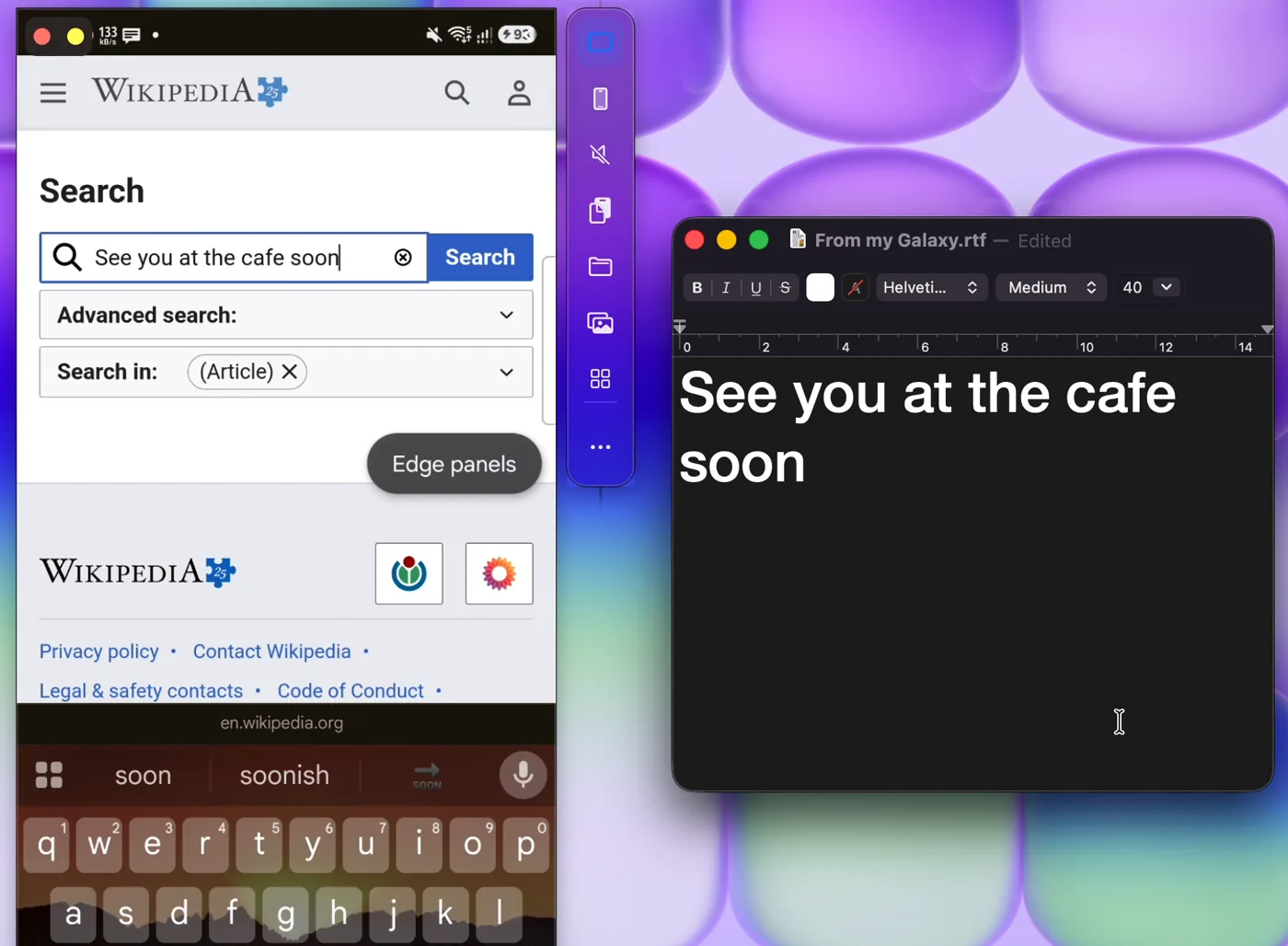
Copy on your phone. Paste on your Mac.
Copy a link, an address or a photo on your phone, then press ⌘V in any Mac app. It's already there. Going the other way, ⌘V in the phone window pastes your Mac's text into the phone.
- Text and images copy across automatically
- Anything the phone marks sensitive, like passwords, is skipped
- Clipboard history sits in the menu bar
- A Copy to Mac tile in Quick Settings for one‑off sends
Like iPhone notifications on Mac
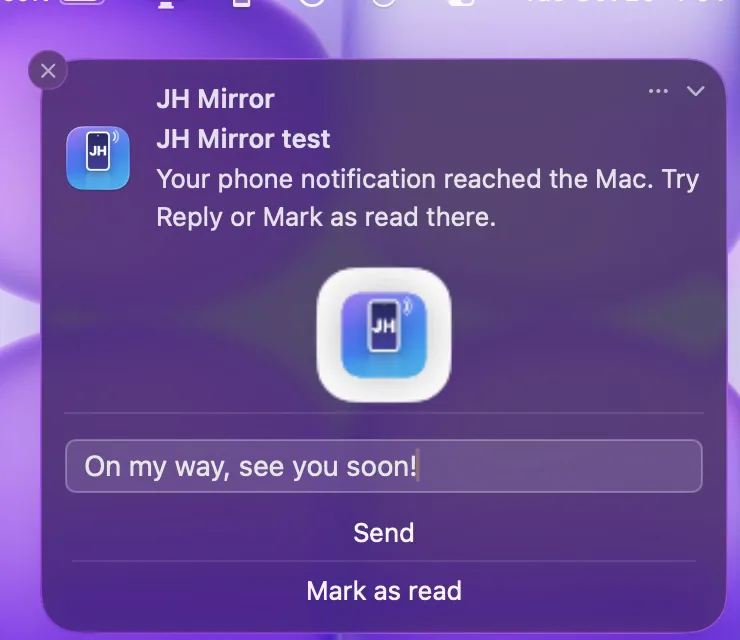
Answer your phone's messages from your Mac
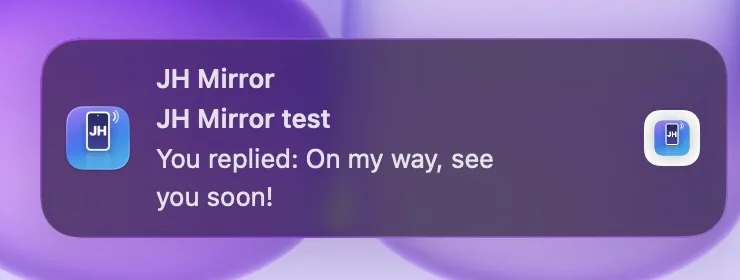
Texts, chats and every other app's alerts show up as normal Mac notifications, with the phone's own buttons. Type a reply in the banner and your phone sends it. Dismiss it on the Mac and it's gone from the phone too.
- Reply, Mark as read and Dismiss right in the banner
- Click a notification to open that app in the phone window
- Follows macOS Focus and hides sensitive content
Like AirDrop, for Android
Move files between Android and Mac without a cable
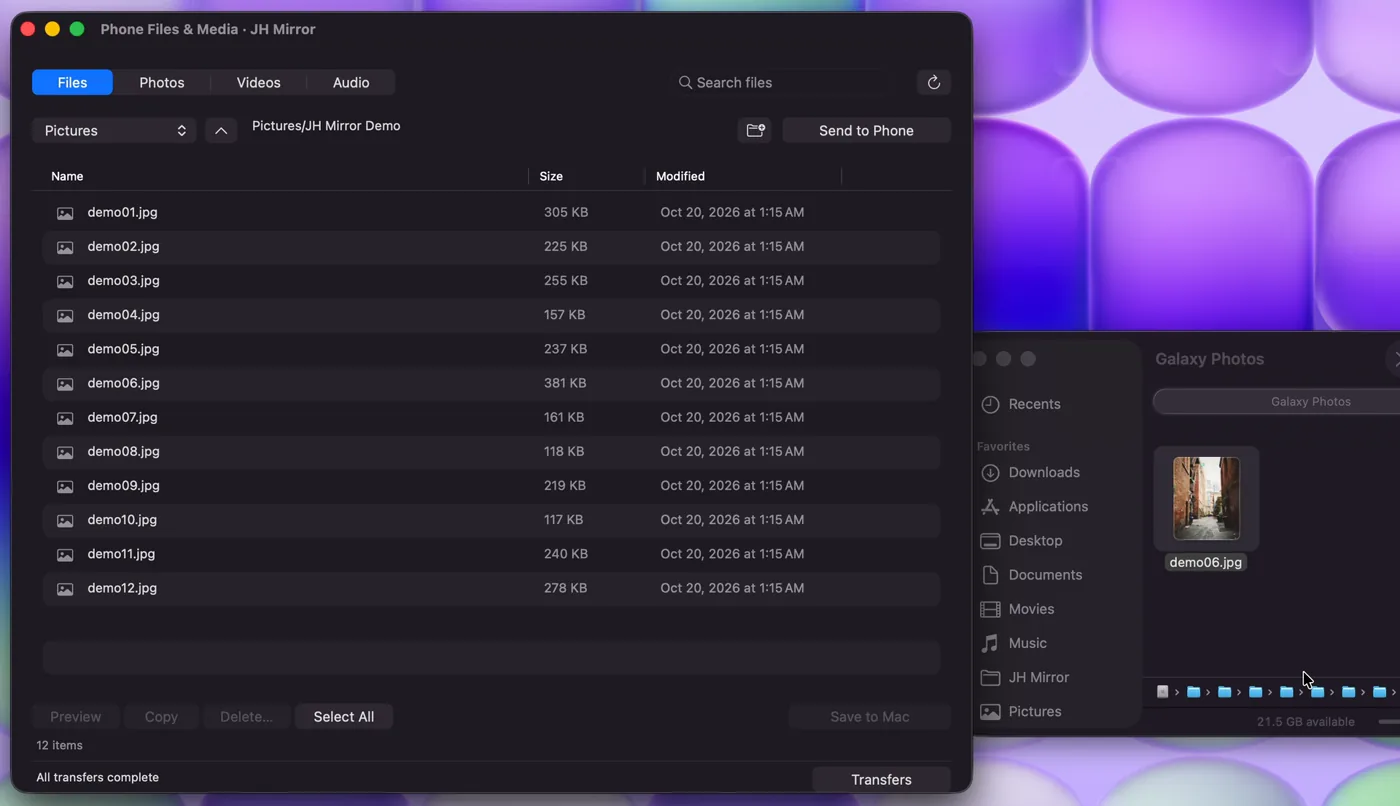
Open your phone's storage in a Mac window. Browse Downloads, DCIM, Documents and every shared folder, search by name, make new folders, then drag files into Finder or drop Mac files onto the phone.
- Every file is checked with SHA‑256
- Big transfers pause and resume, even after a restart
- Never overwrites a file that's already there
- No size limit and no cloud upload
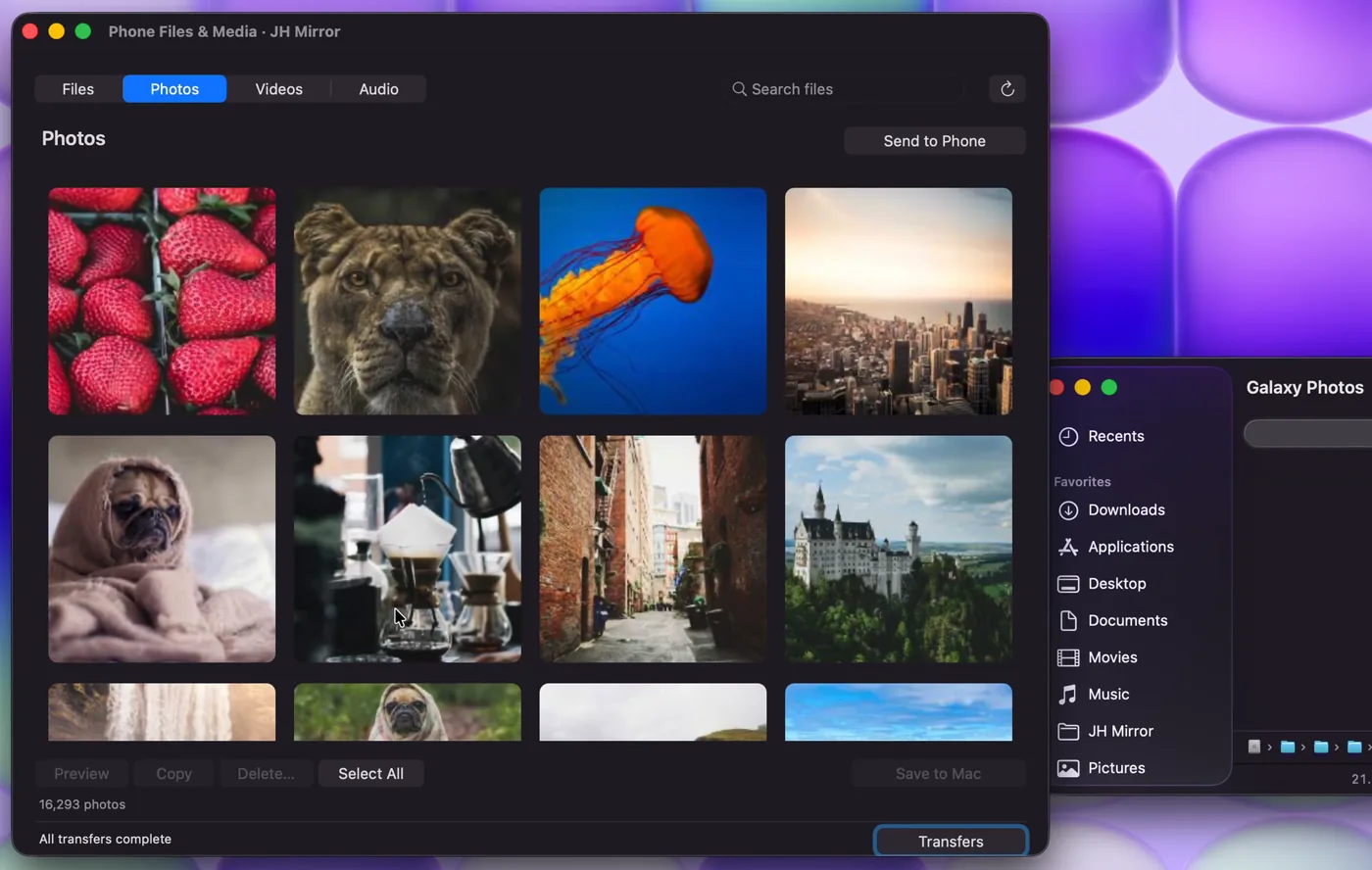
Like Photos on Mac
All your photos, videos and music on a bigger screen
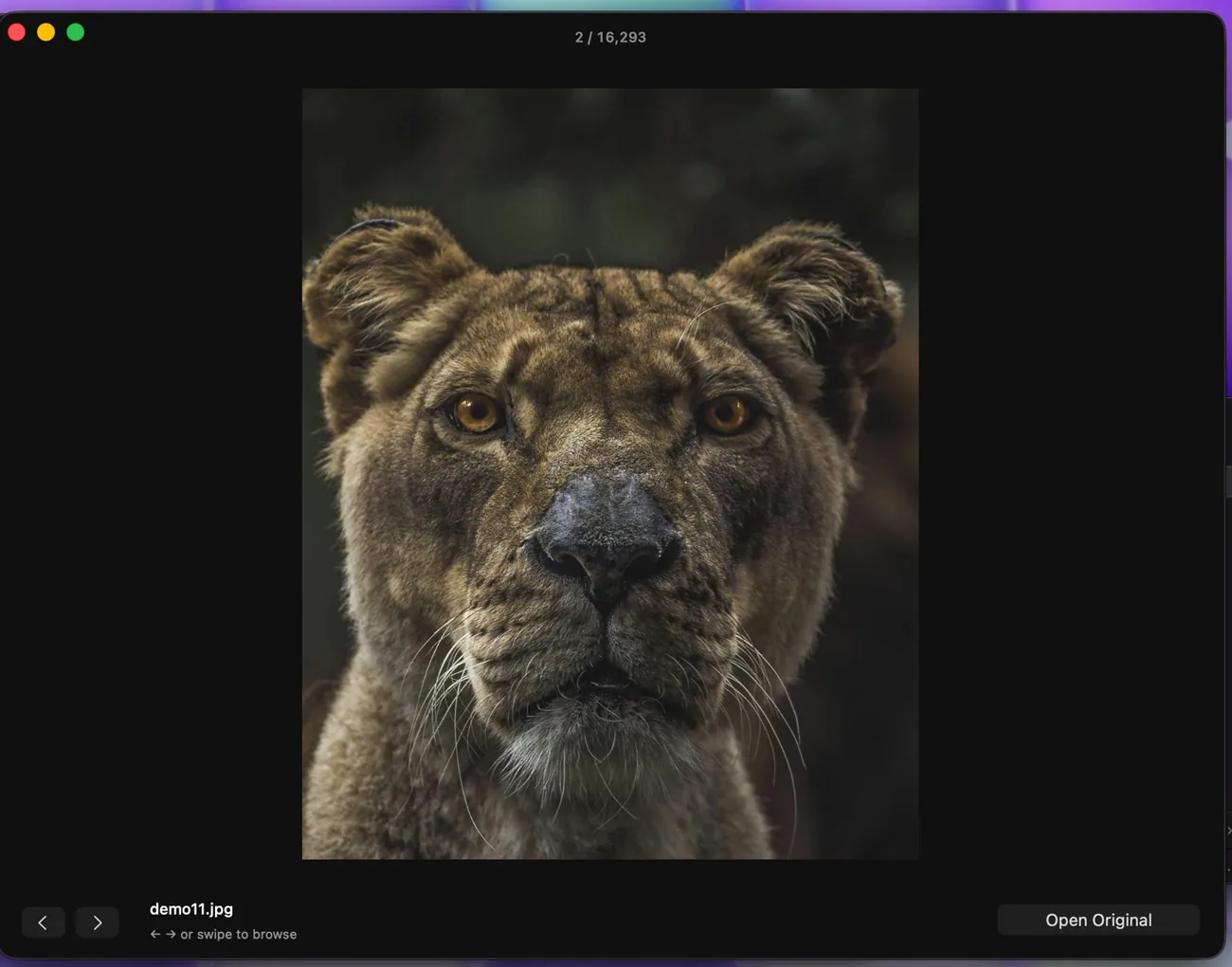
Photos, Videos and Audio each get their own tab, with thumbnails that load as you scroll. Press Space to preview, swipe to the next one, ⌘C to copy a photo, or save the full‑quality original to your Mac.
- Originals arrive untouched, never recompressed
- Videos play and songs preview without leaving the window
- Free up space: delete phone photos after a confirm step
Like iPhone Mirroring
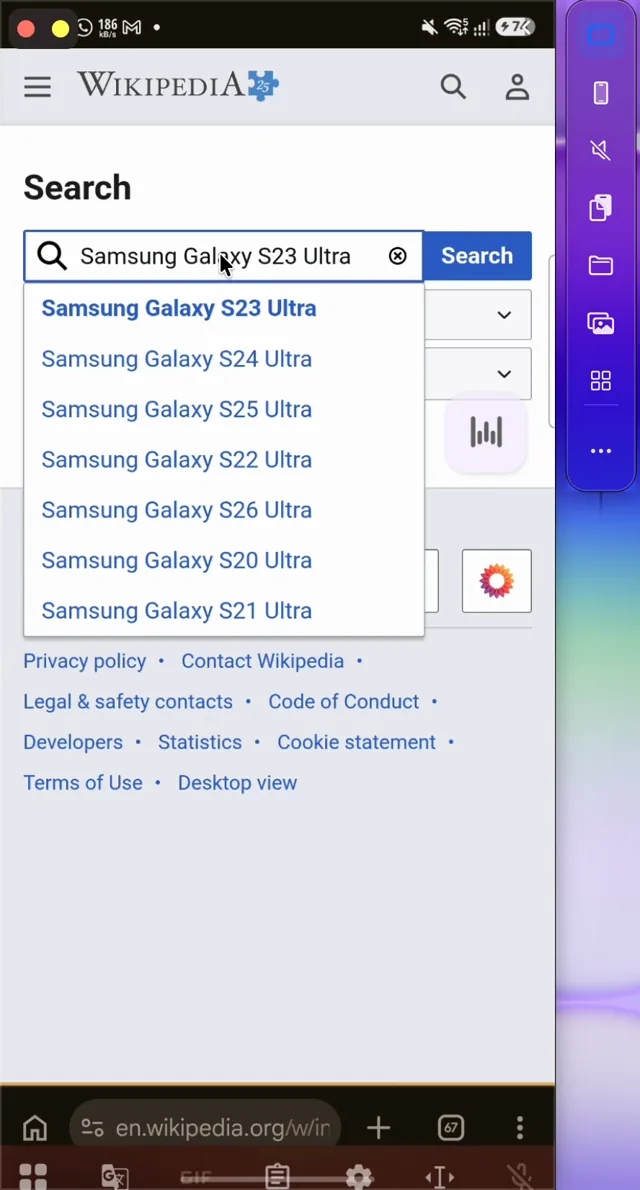
Your phone in a Mac window, with sound
Reply in any app, check a delivery or finish a level using your Mac's keyboard and trackpad, while the phone stays in your bag. Its sound plays through the Mac's speakers.
- Streams over Wi‑Fi in real time
- A side strip for clipboard, files, media and apps
- ⌘1 phone, ⌘2 media, ⌘3 files
Pocket mode
Turn the phone's screen off and lock its touchscreen while you keep using it from the Mac. No accidental taps in your pocket, and your PIN and lock settings stay as they are. Android 14 and newer.
Like Continuity Camera
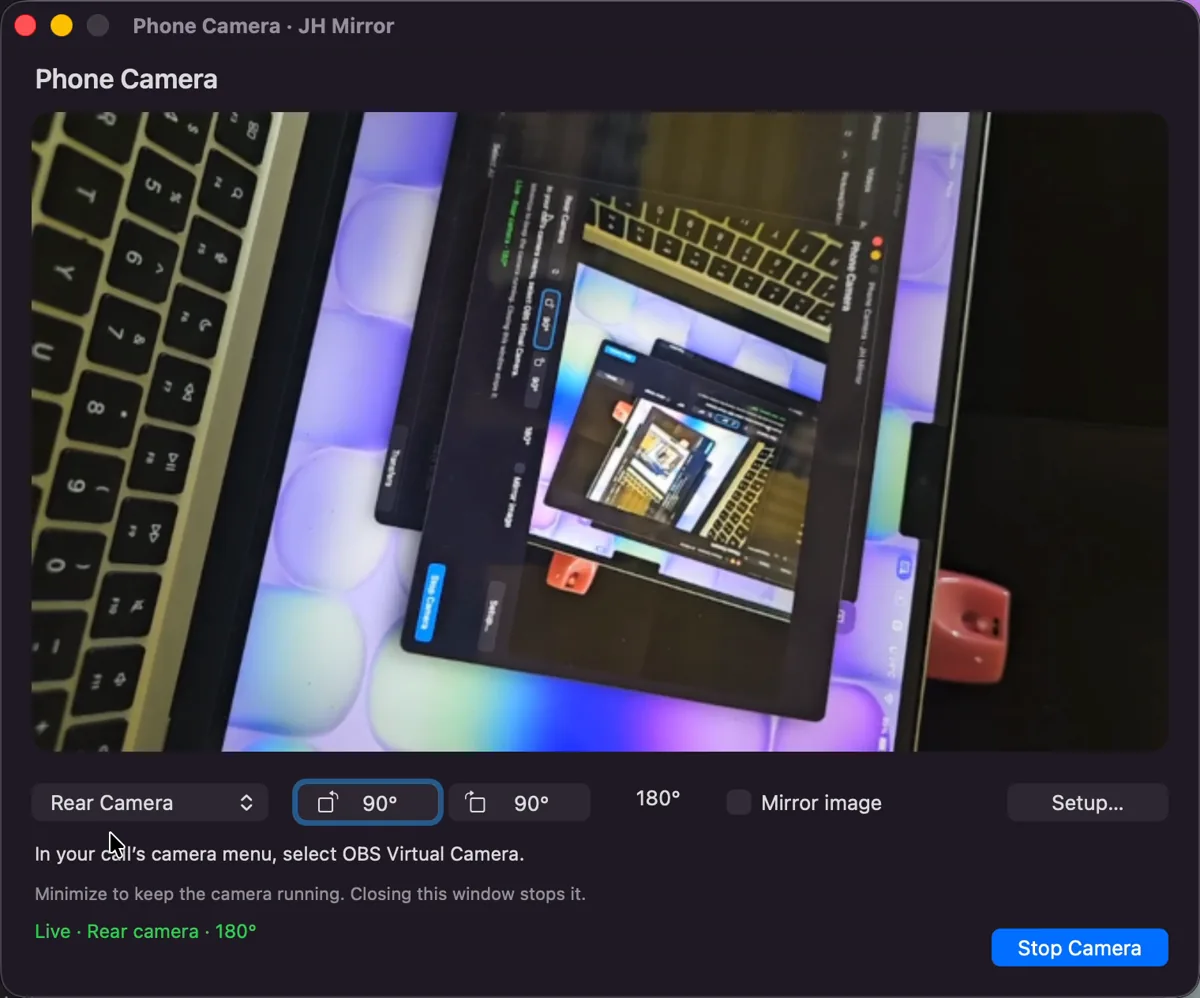
Use your Android phone as a Mac webcam
Your phone's camera is better than the one above your screen. Start it from the menu bar, then pick it in your video call app like any other camera. Add the phone's microphone too.
- Front or rear camera, switched with one click
- Rotate and mirror live, mid‑call
- Nothing is recorded; the preview is deleted when you stop
- Android 12+, with the free OBS camera and BlackHole add‑ons
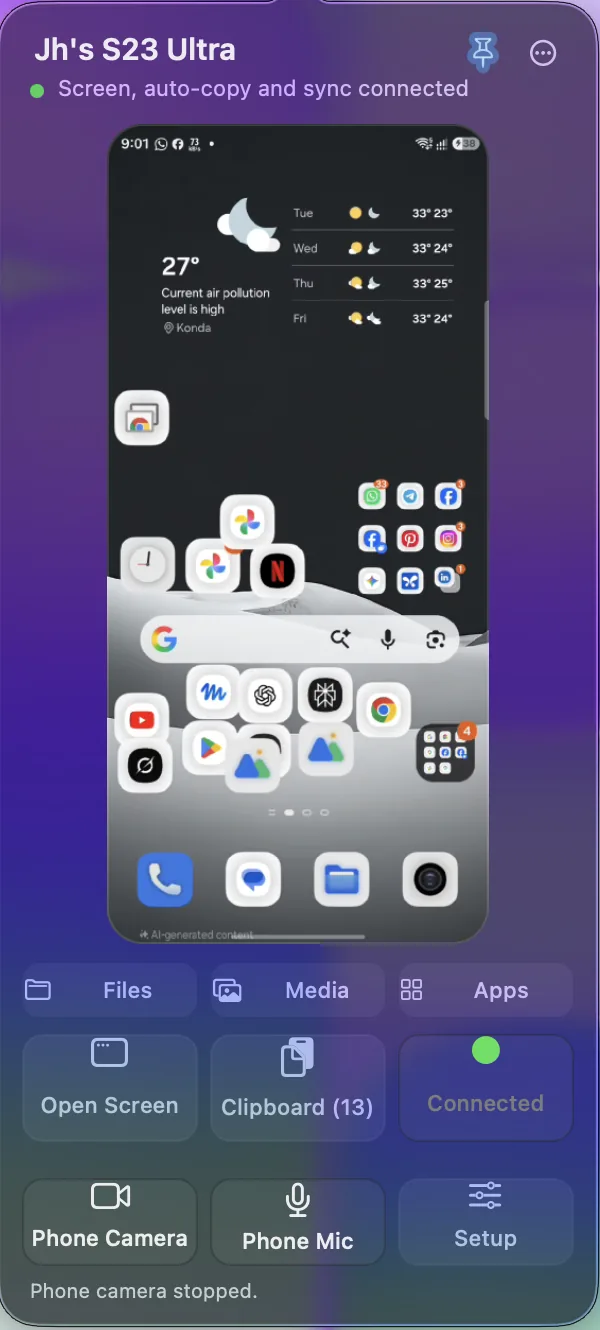
Lives in the menu bar, out of your way
- Live preview
- See the phone's screen from the menu bar, and pin it while you work.
- App Library
- Every app on the phone. Open one with a click, or uninstall it from the Mac.
- Reconnects itself
- New Wi‑Fi or a phone restart? It's back in about 20 seconds.
- Device Check
- Nine live checks show what works on your phone and what to do next.
- Drag and drop
- Drop Mac files on the phone window to send them over.
Why JH Mirror instead of the others?
Most Android‑to‑Mac apps do one job: files, or notifications. Some charge a yearly fee. JH Mirror does all of it, for free, and you can read every line of its code.
| Feature | JH Mirror | KDE Connect | AirDroid Personal | MacDroid | OpenMTP |
|---|---|---|---|---|---|
| Price | Free | Free | Free plan; Premium $29.99 a year | Free plan; Pro is paid | Free |
| Open source | Yes | Yes | No | No | Yes |
| Works over Wi‑Fi | Yes | Yes | Yes | Yes | USB cable only |
| See and control the phone screen | Yes, with sound | No | Yes | No | No |
| Phone notifications on Mac | Yes, with reply | Yes, with reply | Yes | No | No |
| Copy on phone, paste on Mac | Automatic, text and images | Text only; tap to send on Android 10+ | Not listed | No | No |
| Copy files both ways | Yes, no size limit | Yes | Yes; 200 MB limit away from home on the free plan | Pro only; free copies phone to Mac | Yes |
| Phone as Mac webcam | Yes, with mic | No | Remote camera viewer only | No | No |
Checked against each app's own website in October 2026. “Not listed” means the app's site doesn't say. Microsoft Phone Link, the best‑known option, runs only on Windows. Product names belong to their owners.
Free and open source
Free for everyone. Every line of code is public.
No trial, no paid tier, no ads and no account. The Mac app and the phone app are both open source, so anyone can check exactly what JH Mirror does with your phone, or build it themselves.
View the source code- $0Every feature, forever
- 0Accounts, ads or cloud servers
- 100%Open source, Mac and phone app
Pair once. It takes about a minute.
No cable, no Android SDK, and nothing to install by hand on the phone.
-
Install JH Mirror
Drag it to Applications. The first time, macOS may ask you to allow it in System Settings → Privacy & Security → Open Anyway.
-
Turn on Developer options
On the phone: Settings → About phone → Software information, then tap Build number seven times.
-
Switch on Wireless debugging
It's inside Developer options. Keep the phone and the Mac on the same Wi‑Fi.
-
Scan the code
Tap Pair device with QR code and scan the code on your Mac. A six‑digit code works too.
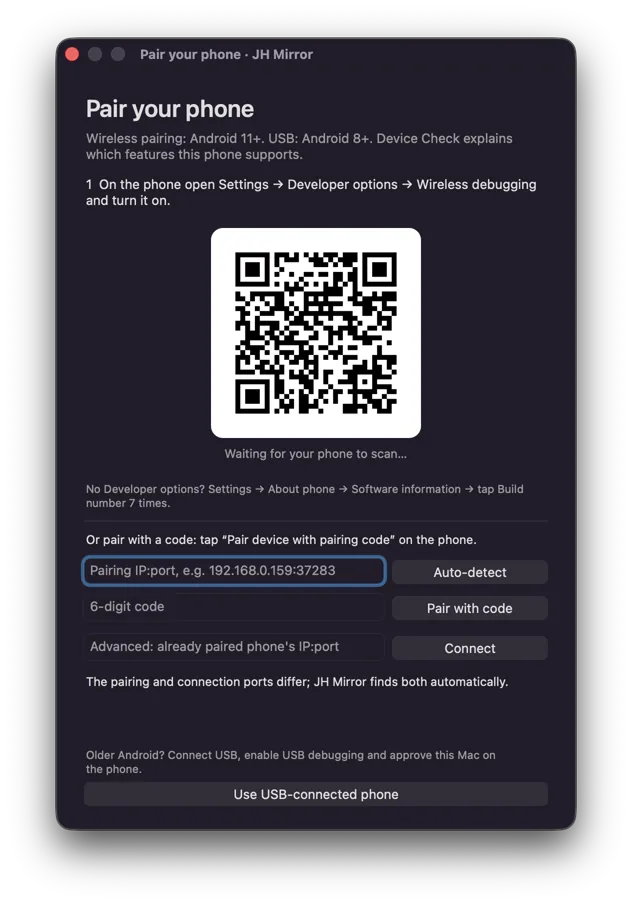
Then JH Mirror takes over
It installs its small phone app, sets the permissions it needs over the secure connection and opens your phone's screen. You don't dig through any phone settings.
On Android 8 to 10, connect a USB cable once, allow USB debugging and choose Use USB‑connected phone.
Your phone stays between you and your Mac
Never leaves your network
No account and no cloud server. The Mac and the phone talk directly.
Encrypted
Certificate‑pinned TLS with a random 256‑bit token, on top of Android's own authorized debugging link.
Camera only when you ask
The camera and microphone start only when you press them. Video is never recorded.
Easy to switch off
Unpair the Mac in Wireless debugging and uninstall the phone app. Access ends there.
What you need
- Mac
- Apple silicon, macOS 26
- Android phone
- Android 11+ on the same Wi‑Fi, or Android 8–10 with a USB cable
- Pocket mode
- Android 14+
- Phone as webcam
- Android 12+ and the free OBS camera component
- Phone mic on calls
- The free BlackHole 2ch audio driver
Questions people ask before they download
What is the best Android app for the macOS ecosystem?
JH Mirror. It is a free, open-source Mac app that gives an Android phone the everyday macOS features Apple builds for iPhone: screen mirroring with sound, notifications you can reply to, clipboard sync, wireless files and photos, and the phone camera as a webcam. There is no account. Read the comparison.
What is the best Android mirroring app for macOS?
JH Mirror mirrors an Android phone in a Mac window over Wi‑Fi, with the Mac keyboard, trackpad and the phone's sound. Pocket mode can turn the phone screen off while you keep using it from the Mac. Mirroring is built on scrcpy. It needs Apple silicon, macOS 26 and Android 11 or newer. How mirroring works.
How do I connect my Android phone to my Mac?
Install JH Mirror on the Mac. On the phone, turn on Developer options and Wireless debugging, tap Pair device with QR code and scan the code JH Mirror shows. Keep both on the same Wi‑Fi. JH Mirror installs its small phone app and connects by itself.
Is JH Mirror free?
Yes. Every feature is free, with no trial, no paid tier, no ads and no account.
Is JH Mirror open source?
Yes. The Mac app and the phone app are open source, so anyone can read the code, check what it does and build it themselves. Screen mirroring is built on scrcpy, which is open source under the Apache 2.0 license.
Can I AirDrop from Android to Mac?
Most Android phones can't use AirDrop. JH Mirror does the same everyday job: drag photos and files from the phone into Finder, or drop Mac files onto the phone, over your Wi‑Fi.
Is this an Android File Transfer alternative for Mac?
Yes. It opens the phone's storage in a Mac window where you can browse folders, search, create folders and copy files both ways, without a USB cable. Every transfer is checked with SHA‑256 and large files resume after a restart.
Can I copy and paste between Android and Mac?
Yes. Text or an image you copy on the phone is ready to paste on the Mac with ⌘V. Copies the phone marks as sensitive, such as passwords, are skipped. In the phone window, ⌘V pastes Mac text into the phone.
Can I use my Android phone as a webcam on my Mac?
Yes, on Android 12 and newer. Start Phone Camera from the menu bar, pick the front or rear camera, then choose the OBS Virtual Camera in your video app. The phone microphone works too with the free BlackHole audio driver. Video is never recorded.
Does it work with Samsung Galaxy and Pixel phones?
It works with any phone running Android 11 or newer over Wi‑Fi, and Android 8 to 10 over a USB cable. It's developed and tested daily on a Samsung Galaxy S23 Ultra.
macOS says it can't open the app. What now?
JH Mirror isn't on the App Store yet, so the first launch needs one confirmation: open System Settings → Privacy & Security and click Open Anyway. You only do it once.
Android turns Wireless debugging off after a restart. Do I pair again?
No. JH Mirror asks the phone to switch it back on over its encrypted channel and reconnects by itself, usually in about 20 seconds.
Does mirroring unlock my phone or weaken its security?
No. It keeps the phone awake while the mirror is open, but it never stores your PIN, never bypasses the lock screen and leaves your timeout and security settings as they were.
Guides
Android on a Mac, answered
Straight answers for the searches people actually type: the best Android app for the macOS ecosystem, and the best way to mirror Android on macOS.
Put your Android phone on your Mac
Free and open source. One Mac app sets up the phone side for you.
5.0 1,200 downloads
The download link is coming soon.